Integrating Watercolor Rose Floral Flower Assets into Professional Design Workflows
In the fast-paced world of digital design and content creation, efficiency often competes with aesthetic quality. For professionals ranging from small business owners to freelance graphic designers, the ability to produce high-quality visual assets quickly is a critical skill. This is where curated collections like Watercolor Rose Floral Flower elements become indispensable. Rather than spending hours painting individual petals or searching for inconsistent stock images, creators can leverage pre-made, high-resolution assets to streamline their production pipeline. These elements are not merely decorative; they are functional tools that fit seamlessly into broader creative processes, from branding identity to event marketing.
The value of such assets lies in their versatility and technical readiness. When you incorporate Watercolor valentine rose graphics into your projects, you are bypassing the initial stages of asset creation—sketching, scanning, cleaning up backgrounds, and color correcting. Instead, you move directly to composition and layout. This shift allows you to focus on the strategic aspects of your design, such as hierarchy, messaging, and user experience, while maintaining a handcrafted, organic aesthetic that resonates with modern audiences.
Technical Specifications and Workflow Compatibility
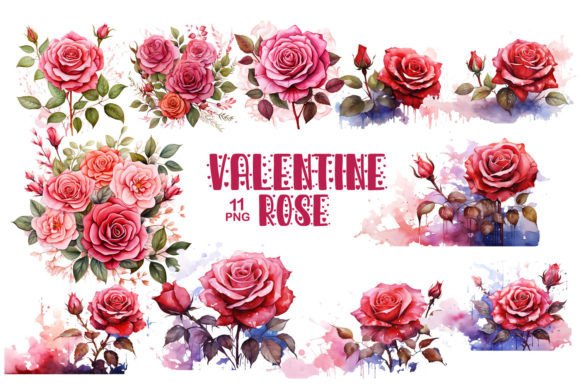
Before integrating any digital asset into a professional workflow, understanding its technical foundation is crucial. The Watercolor Rose Floral Flower collection is engineered for high-end print and digital applications. Each of the 11 PNG files is rendered at 300 DPI (dots per inch) in RGB color format, with dimensions of 3000×3000 pixels. This high resolution ensures that the images remain crisp and detailed whether they are scaled down for a mobile website banner or printed on large-format posters.
The transparent background is perhaps the most significant feature for workflow efficiency. It eliminates the need for time-consuming masking or clipping path work in software like Adobe Photoshop, Illustrator, or Canva. You can drag and drop these elements directly onto your canvas, layering them over text, photographs, or solid colors without worrying about white boxes or jagged edges. This compatibility extends across various platforms, making it easier to maintain consistency when moving assets between different tools in your tech stack.
- High Resolution: 3000×3000 px size allows for significant scaling without pixelation.
- Transparent Backgrounds: Saves hours of editing time by removing the need for manual cutouts.
- RGB Color Format: Optimized for digital displays, web use, and standard home/office printing.
- File Type: PNG format preserves transparency and quality better than JPEG for layered designs.
Strategic Applications in Branding and Identity
For entrepreneurs and marketers, brand identity is more than just a logo; it is the cumulative effect of every visual touchpoint. Watercolor valentine rose elements can serve as subtle yet powerful components of a brand’s visual language. They add warmth, authenticity, and a human touch to corporate materials that might otherwise feel sterile. When used in packaging design, labels, or gift tags, these floral motifs create an unboxing experience that feels personal and curated.
Consider the process of launching a new product line. During the planning phase, you might use these watercolor roses to create mood boards that define the aesthetic direction. As you move into execution, the same assets can be adapted for social media banners, email newsletter headers, and website hero sections. Because the collection includes multiple variations, you can establish a consistent visual theme across different channels without repeating the exact same image, which helps keep your audience engaged.
Furthermore, these elements are ideal for businesses in the wedding, beauty, wellness, and lifestyle sectors. A boutique skincare brand, for instance, might use the soft, organic lines of the watercolor roses on their product labels to convey natural ingredients and gentle care. This alignment between visual style and brand values strengthens customer trust and recognition.
Enhancing Event Marketing and Invitations
Event planning requires meticulous attention to detail and a cohesive visual narrative. Whether you are organizing a birthday party, a corporate gala, or a wedding, the invitation sets the tone for the entire event. Using Watercolor Rose Floral Flower graphics in your invitation design process allows for rapid iteration. You can test different layouts, color palettes, and typography combinations quickly because the base assets are already polished.
Beyond the invitation itself, these assets extend to the broader ecosystem of event supplies. You can use the same floral elements on:
- Posters and Banners: Create eye-catching promotional materials for social media or physical display.
- Table Cards and Menus: Maintain thematic consistency throughout the venue.
- Digital Scrapbooking: Document the event creation process or share behind-the-scenes content with clients.
- Thank You Cards: Extend the brand experience post-event with personalized notes featuring the same floral motifs.
This holistic approach ensures that every guest interaction, from the initial save-the-date to the final thank-you note, feels part of a unified experience. It also simplifies the design process for event planners who may not have advanced graphic design skills, allowing them to produce professional-grade materials using user-friendly templates.
Optimizing Digital Content and Web Design
In the digital realm, load times and visual appeal must be balanced. While the source files are high-resolution, it is essential to optimize them for web use. Before uploading Watercolor valentine rose images to your website or blog, consider compressing them using tools like TinyPNG or Squoosh. This reduces file size without significantly compromising quality, ensuring faster page loads and better SEO performance.
These floral elements can enhance various digital formats. Bloggers can use them as decorative dividers between sections, making long-form content more readable and visually engaging. Educators and course creators can incorporate them into slide decks and worksheets to make learning materials more inviting. For e-commerce sites, adding subtle watercolor accents to product pages can soften the commercial feel and encourage longer browsing sessions.
When integrating these assets into web design, think about placement and hierarchy. Use the roses to frame key calls-to-action or to highlight testimonials. Avoid cluttering the interface; instead, let the negative space around the flowers enhance their impact. This mindful application respects the user’s attention while adding aesthetic value.
Best Practices for Organization and Long-Term Use
To maximize the return on investment for any digital asset library, organization is key. When you download the Watercolor Rose Floral Flower collection, take a moment to set up a structured folder system. Store the original 3000×3000 px files in a master archive, and create separate folders for resized versions tailored to specific platforms (e.g., Instagram posts, email headers, print labels).
Additionally, consider creating a style guide for your team or personal reference. Document how and when to use these floral elements. Specify preferred color combinations, minimum clear space around the images, and prohibited uses. This documentation ensures consistency, especially if multiple people are working on projects involving these assets. It also speeds up onboarding for new team members or collaborators.
Finally, stay updated with design trends. While watercolor aesthetics have enduring appeal, their application evolves. Experiment with blending modes in Photoshop, overlaying textures, or combining the roses with geometric shapes to keep your designs fresh. By treating these assets as flexible building blocks rather than static images, you can extend their usability across countless projects and years.
In conclusion, the Watercolor Rose Floral Flower collection is more than a set of pretty pictures; it is a practical resource for enhancing efficiency, consistency, and quality in your creative workflows. By understanding its technical specifications and strategically applying it across branding, events, and digital content, you can elevate your output while saving valuable time. Whether you are a seasoned designer or a hobbyist looking to polish your projects, these assets offer a reliable foundation for beautiful, professional results.