Watercolor Landscape Creator: A Practical Guide for Designers and Hobbyists
Have you ever dreamed to create your own watercolor landscape without spending years mastering brush techniques? For many digital creators, scrapbookers, and graphic designers, the desire to incorporate organic, hand-painted aesthetics into their work is strong, but the learning curve of traditional media can be prohibitive. This is where tools like Watercolor Landscape Creator enter the workflow. Rather than being a software application, this resource is a curated collection of high-quality, hand-painted watercolor images designed to streamline the design process. By understanding what this set offers, users can better determine if it aligns with their creative goals and project requirements.
Understanding the Resource Composition
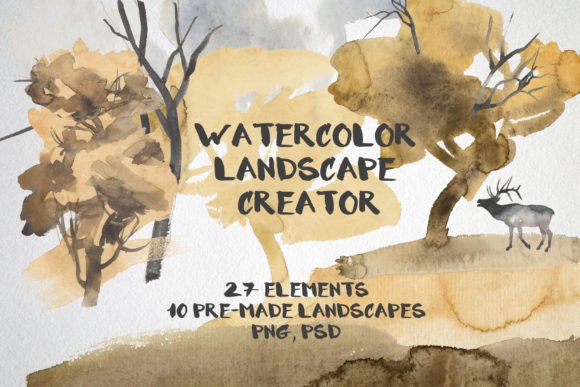
The core value of Watercolor Landscape Creator lies in its modularity and ease of use. The set comprises 27 different individual elements, allowing users to construct custom scenes rather than relying solely on static, pre-made compositions. This approach provides a balance between convenience and creative control. Each element is provided in PNG format with a transparent background, which is critical for seamless integration into various design layouts. Additionally, the package includes 10 pre-made landscapes in JPEG format for those who need immediate solutions, as well as a single PSD file containing all elements for advanced editing capabilities.
Technical specifications are a vital consideration for any digital asset purchase. All images in this set are rendered at 300 DPI in RGB color mode. The 300 DPI resolution ensures that the graphics remain crisp and detailed when used for print applications, such as greeting cards or posters. The RGB color profile is standard for digital displays, making these assets suitable for web design and screen-based projects. However, designers planning for professional offset printing should be aware that converting RGB to CMYK may result in slight color shifts, a common tradeoff in digital-to-print workflows.
Primary Use Cases and Applications
The versatility of Watercolor Landscape Creator makes it applicable across a wide spectrum of creative industries. Its primary strength is in projects that require a soft, artistic touch without the time investment of creating original illustrations from scratch. Common applications include:
- Print-on-Demand Products: The high-resolution PNGs are ideal for textile designs, tote bags, and apparel where transparency allows the fabric color to show through specific areas.
- Paper Goods and Stationery: Greeting cards, wedding invitations, and planners benefit significantly from the organic feel of watercolor textures. The modular elements allow for customization to fit specific themes or seasons.
- Digital Content Creation: Web designers and social media managers can use these assets to add visual interest to blog headers, newsletter backgrounds, or digital planners.
- Scrapbooking and Memory Keeping: For hobbyists, the ability to layer mountains, trees, and sky elements creates personalized layouts that enhance photo albums and memory books.
For educators and authors, these elements can serve as illustrations for children’s books or educational materials, providing a gentle, non-distracting aesthetic that complements text.
Evaluating Benefits and Tradeoffs
When considering Watercolor Landscape Creator, it is essential to weigh the advantages against potential limitations. The most significant benefit is efficiency. Creating realistic watercolor effects digitally requires advanced skills in blending modes, texture overlays, and brush dynamics. This set bypasses that technical barrier, offering ready-to-use assets that maintain the authentic look of hand-painted art. The inclusion of transparent backgrounds eliminates the tedious task of manual cutouts, saving hours of post-processing time.
However, there are tradeoffs to consider. While the set offers 27 elements, the variety is finite. Users seeking highly specific botanical accuracy or unique geographical features may find the selection limiting. Furthermore, because these are pre-made assets, there is a risk of encountering similar designs if other designers purchase and use the same pack. To mitigate this, users should leverage the PSD file to adjust colors, scale, and composition, ensuring a unique final product.
Another consideration is the skill level required for assembly. While no painting skill is needed, basic proficiency in graphic design software (such as Adobe Photoshop, Affinity Photo, or free alternatives like GIMP) is necessary to layer the PNGs effectively. Users must understand concepts like layer ordering, masking, and color adjustment to achieve professional results.
Decision-Making Insights: Is This Right for You?
Determining whether Watercolor Landscape Creator is a strong fit depends largely on your current workflow and project needs. This resource is an excellent choice if you frequently produce content that requires a cohesive, artistic theme but lack the time to illustrate each piece manually. It is particularly valuable for small business owners, Etsy sellers, and freelance designers who need to maintain a consistent brand aesthetic across multiple product lines.
Conversely, this tool may not be the best solution if you require fully customizable vector graphics. Since these are raster images (PNG/JPEG), they cannot be scaled infinitely without loss of quality. If your projects involve large-format signage or require frequent color changes via vector paths, investing in vector-based illustration tools or hiring a custom illustrator might be more appropriate. Additionally, if you are looking to develop a unique artistic style that distinguishes you from competitors, relying heavily on stock assets may hinder brand differentiation.
Comparing Alternatives
In the broader market of digital design resources, Watercolor Landscape Creator competes with several alternatives. Subscription-based stock photo libraries offer vast collections of watercolor images, often at a lower monthly cost. However, these libraries rarely provide the modular, layered approach found in this set, requiring users to search for individual components separately. Custom commissioning an artist provides total uniqueness but comes with higher costs and longer turnaround times.
For those with intermediate digital art skills, using Procreate or Photoshop brushes to paint landscapes from scratch offers ultimate freedom. Yet, this demands significant time and practice. Watercolor Landscape Creator occupies a middle ground, offering a shortcut that retains a handcrafted feel without the steep learning curve of traditional media.
Final Considerations for Buyers
Before purchasing, review the license terms associated with the shop. Most digital asset creators allow for both personal and commercial use, but restrictions may apply regarding mass production or resale of the raw files. Ensure that the intended use case complies with these terms. Additionally, consider the compatibility of the file formats with your existing software. While PNG and JPEG are universally supported, the included PSD file requires Adobe Photoshop or compatible software to access the layered structure.
In conclusion, Watercolor Landscape Creator serves as a practical bridge between artistic aspiration and efficient production. It empowers users to create visually appealing, hand-painted style landscapes for a variety of media, from textiles to web design. By understanding its modular nature, technical specifications, and appropriate use cases, designers and hobbyists can make an informed decision about whether this tool enhances their creative toolkit. For those seeking to add warmth and organic texture to their projects without the time commitment of manual painting, this set offers a compelling and efficient solution.